
Insta Pro 2 APK: Features, Download, Dual Account & Complete Guide
Using two Instagram accounts on the same phone can get annoying, especially when you have to switch between logins all the time. It can be even more frustrating when you want to download a reel or use extra privacy features but the regular Instagram app doesn’t offer them. Insta Pro 2 is made for users who want a separate Instagram account alongside the official app on Android. It adds useful options like direct media downloads, Ghost Mode, an ad-free feed, and other privacy controls without replacing your main Instagram app. In this guide, we’ll look at its features, requirements, installation steps, safety, and common problems.
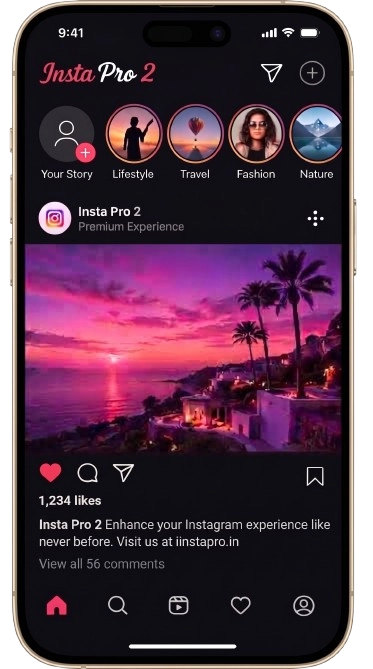
What Is Insta Pro 2 APK?
Insta Pro 2 is a modified Android package based on the official Instagram client, built under the com.instapro2 package identifier. It functions as a stand-alone dual application, allowing you to install and run it directly beside the standard Play Store version without causing installation conflicts. It expands on standard social features by introducing built-in media download tools, deep privacy toggles (Ghost Mode), interface adjustments, and content filters.
Insta Pro 2 vs Official Instagram
Feature / Capability | Official Instagram | Insta Pro 2 |
Package ID | com.instagram.android | com.instapro2 |
Media Saving | In-app bookmarking only (No direct video saving to gallery) | Direct 1-tap download for reels, stories, audio, and feed posts |
Feed Experience | Contains sponsored posts, suggested reels, and ads | Ad-blocking filters remove sponsored posts and shopping grids |
Ghost Mode | Basic online status toggle only | Hide typing indicators, viewed story statuses, and read receipts |
Profile Pictures | Non-expandable thumbnails | Tap-to-zoom full-resolution display photos (DP) |
Dual Account Usage | Requires switching accounts inside a single app window | Runs as a completely separate app icon on your home screen |
Installation Source | Google Play Store | Manual APK package installation |
Why Use Insta Pro 2?
Standard Instagram works fine for casual scrolling, but it falls short when you need advanced profile management or offline content access. Insta Pro 2 addresses these exact bottlenecks with four core utility upgrades:
- True Dual-Account Setup: Because it uses a unique package signature, you can keep your primary profile on the official Instagram app and run a business or secondary account on this build without constant account switching.
- Deep Ghost Privacy Controls: Browse the platform without leaving a digital footprint. You can view stories silently, read direct messages without triggering blue seen receipts, and hide your active typing state.
- Direct Media Downloads: Eliminate sketchy third-party saver sites. Download reels, carousel images, voice notes, and stories in their original upload resolution directly to your local storage with one tap.
- Ad-Free Clean Feed: The built-in ad blocker removes sponsored posts, algorithmic product suggestions, and shopping grids, giving you a faster and distraction-free timeline.
Insta Pro 2 APK Details & Specifications
The table below outlines the core technical details, file requirements, and package parameters for the build:
Parameter | Technical Detail |
App Name | Insta Pro 2 (Instagram 2) |
Package Name | com.instapro2 |
Current Build Version | v15.50 |
File Size | ~72 MB |
Supported OS | Android 5.0 (Lollipop) or higher |
Developer / Source | Sam Mods |
License | Free (Third-Party Mod) |
Root Access Required? | No (Works on standard factory ROMs) |
Category | Social / Media Utility |
Key Features of Insta Pro 2
Insta Pro 2 builds on standard Instagram functionality by integrating essential utilities directly into the main interface, eliminating the need for third-party downloader sites or external helper apps.
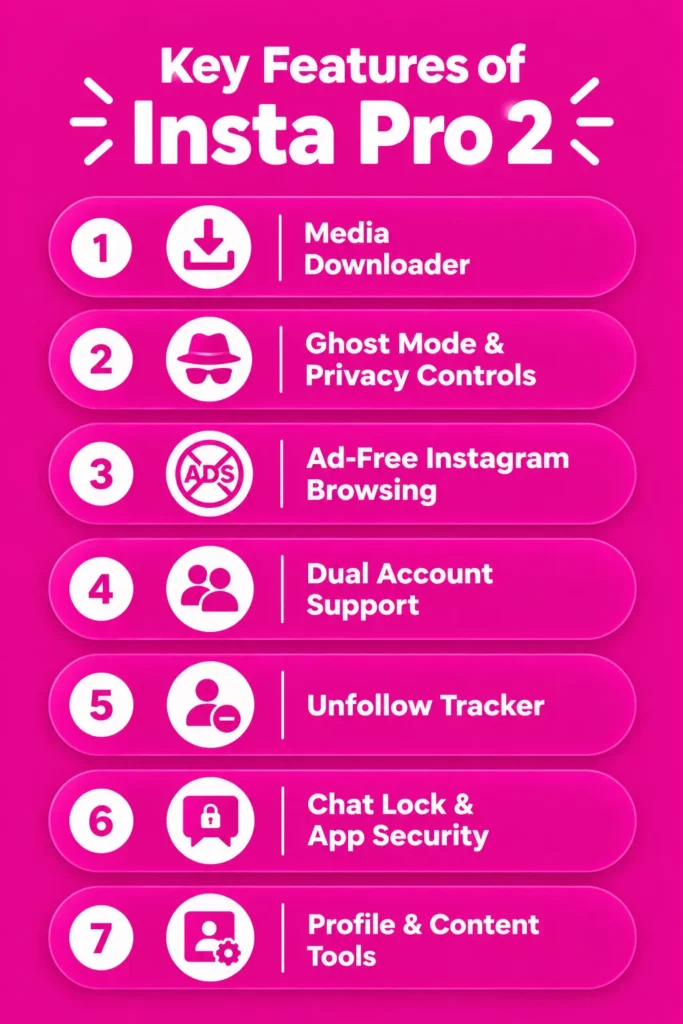
Media Downloader
Downloading content is handled natively with a dedicated icon under every post. You can save:
- Reels & Feed Videos: Download short clips, long videos, and carousels directly to your gallery in full original resolution.
- Stories with Audio: Save public stories (and private stories from accounts you follow) with background music intact.
- High-Res Photos: Download images without standard compression artifacts.
Ghost Mode & Privacy Controls
Ghost mode allows you to browse without broadcasting your presence across the platform:
- Hide Story Views: Watch stories without adding your profile to the viewer list.
- Unseen Direct Messages: Open and read DMs without triggering the “Seen” receipt for the sender.
- Hide Typing Indicator: Prevent the real-time typing status from showing when drafting replies in chats.
- Anonymous Live Streams: Join live broadcasts without appearing in the participant count or stream notifications.
Ad-Free Instagram Browsing
The app strips out sponsored posts, promoted brand banners, and suggested shopping carousels. This keeps your main timeline clean, speeds up feed loading, and significantly cuts down on background data consumption.
Dual Account Support
Using a separate package signature (com.instapro2), the app installs as an entirely distinct client. This allows you to keep your main profile active on the official app while running a secondary or business account simultaneously on the same Android device.
Unfollow Tracker
Instead of downloading risky third-party account analyzers, you get built-in follower insights. The app automatically displays a clear “Follows You” tag on profiles and lets you check who unfollowed your account directly from your settings dashboard.
Chat Lock & App Security
You do not need external app lockers to safeguard your conversations. Insta Pro 2 includes a native security suite that lets you lock the entire application or individual chat threads using a custom PIN, pattern, or your device’s fingerprint scanner.
Profile & Content Tools
- Full-Resolution Profile Picture (DP) Zoom: Long-press or tap any user’s profile avatar to zoom and download the full-size image.
- Text & Caption Copier: Copy any comment, post caption, or bio text directly to your clipboard with a single tap.
- In-App Translation: Translate captions and foreign-language comments instantly using integrated translation engines.
Insta Pro 2 vs Insta Pro vs Official Instagram
Choosing the right version comes down to whether you want a secondary standalone app, a replacement for the stock client, or the standard unmodified platform. The table below breaks down the primary differences:
Feature / Detail | Official Instagram | Insta Pro | Insta Pro 2 |
Package Name | com.instagram.android | com.insta / com.instagram.android | com.instapro2 |
App Coexistence | Base client | Replaces official app (on base signature) | Runs alongside the official app seamlessly |
Dual Account Icon | Requires manual switching inside one app | Single app interface | Independent second app icon on home screen |
Built-in Media Downloader | No | Yes (Reels, stories, audio, photos) | Yes (Reels, stories, audio, photos) |
Ghost Privacy Controls | Basic active status toggle only | Full ghost suite (hide seen, typing, story views) | Full ghost suite (hide seen, typing, story views) |
Ad-Free Browsing | No (Contains sponsored posts & shopping) | Yes (strips sponsored posts) | Yes (strips sponsored posts) |
App & Chat Lock | No (requires phone system lock) | Built-in PIN, pattern & fingerprint lock | Built-in PIN, pattern & fingerprint lock |
Insta Pro 2 vs Insta Pro
Both apps share the exact same underlying codebase, mod features, media downloaders, and ghost mode settings developed by Sam Mods. The only difference is the package name:
- Insta Pro (com.insta): Acts as a direct replacement for standard Instagram. In most cases, you need to uninstall the Play Store version before installing it to avoid package signature conflicts.
- Insta Pro 2 (com.instapro2): Built as a dedicated clone package. Its unique directory structure allows Android to recognize it as a completely distinct application, letting you keep both apps installed simultaneously without error prompts.
Insta Pro 2 vs Official Instagram
While the official Instagram app focuses on pushing algorithmic recommendations, sponsored ads, and in-app engagement tools, Insta Pro 2 prioritizes user utility and control:
- Storage & Sharing: The official app limits you to in-app bookmarks, whereas Insta Pro 2 gives you offline access with direct gallery downloads.
- Privacy & Footprint: Official Instagram alerts senders when you read direct messages or watch their stories; Insta Pro 2 gives you full control to browse completely undetected.
- Workflow: Instead of logging out or toggling between work and personal profiles inside a single window, Insta Pro 2 lets you isolate your accounts into two separate active workspaces.
System Requirements & Compatibility
Check these basic requirements to make sure your device has enough storage, memory, and Android support before installing Insta Pro 2.
Android Requirements
Media and storage permissions may be needed for saving photos and videos.
Camera and microphone access may be required for supported stories, calls, or media features.
The app is designed to run on standard Android software without unlocking the bootloader.
Does Insta Pro 2 Work on iPhone?
No. Insta Pro 2 is distributed as an Android APK and is not designed to run directly on Apple's iOS system. Be cautious of websites claiming to offer an iPhone IPA, configuration profile, or web-wrapped version of the same mod.
Can You Use Insta Pro 2 on PC?
There is no standard Windows .exe or macOS .dmg installer. However, an Android emulator can provide an environment for running Android applications on a computer.
Install an Emulator
Install a compatible Android emulator on your Windows or Mac computer.
Add the APK
Import the Insta Pro 2 APK into the emulator using its built-in APK installation option.
Set Up the App
Complete the Android-style setup inside the emulator and sign in if supported.
How to Download & Install Insta Pro 2 APK
Getting the app running on your phone takes less than two minutes. Just walk through these basic steps:
Download the Insta Pro 2 APK
Head over to the download area and grab the setup file. Make sure you pick the package named com.instapro2—this is the clone version that sits alongside your regular Instagram without interfering with it.
Enable APK Installation on Android
Android naturally blocks files downloaded outside the Play Store until you give it permission:
- Open your phone Settings.
- Tap Apps (or Privacy & Security, depending on your phone brand).
- Find Special App Access and select Install Unknown Apps.
- Tap the browser or file manager you used to grab the file, then flip the switch to allow installs.
Install and Log In
- Pull up your Files or Downloads folder.
- Tap the file and press Install.
- Once it finishes, launch the new app icon from your home screen.
- Type in your username and password directly to sign in. (Using the “Log in with Facebook” button often throws a connection error on modified apps, so direct login works best.)
How to Update Insta Pro 2 Without Losing Data
You don’t need to wipe your account or lose saved preferences just to get the newest features.
Check Your Current Version
See what build you have before downloading anything new:
- Open the app and go to your profile.
- Tap the three-line menu at the top right and pick Insta Pro Settings.
- Scroll down and tap About to check your version number.
Install the Latest Update
- Download the updated package file from the download page.
- Leave your old app installed. Tap the newly downloaded file directly.
- Your phone will show an Update prompt instead of asking for a fresh install. Tap it, and your chats, logins, and preferences will stay right where they are.
What to Do If the Update Fails
- Mismatched Package: Make sure you downloaded com.instapro2 and didn’t accidentally grab the standard com.insta base file. Android won’t let different packages overwrite each other.
- Low Storage: Free up around 400–500 MB of space so your phone can unpack and replace the old system files.
- Stuck Cache: Restart your phone and run the installer again. A quick reboot clears background tasks that might be holding onto older app files.
Is Insta Pro 2 Safe to Use?
Any time you install a modified build, security has to be your first thought. Here is the realistic breakdown of how safe the app actually is and what you should watch out for.
Privacy & Account Security
The developers built anti-ban rules into the code so your normal scrolling doesn’t raise flags with automated security bots. Still, remember that Meta does not run this app. The file won’t steal your login credentials, but you take a small risk anytime you type your password into an unofficial client.
APK Permissions to Check
Keep an eye on what pop-ups appear when you first launch the app:
- What makes sense to allow: Storage access (so your phone can actually save photos and reels), along with camera and microphone access if you take calls or share stories.
- What you should deny: Never give the app access to your contact book, SMS inbox, or live GPS location. It runs fine without touching any of those.
How to Reduce Security Risks
- Start with a backup profile: If you want to test aggressive privacy toggles or mass-download media, try it on a secondary account first.
- Turn on Two-Factor Authentication: Use an authenticator app (like Google Authenticator) so no one can access your profile with just a password.
- Don’t spam actions: Avoid rapidly following dozens of accounts or posting back-to-back comments. Instagram’s safety filters flag sudden bot-like activity no matter what app you use.
Common Insta Pro 2 Problems & Fixes
If something goes wrong during setup or daily use, try these straightforward fixes:
Insta Pro 2 Not Installing
When your phone throws the generic "App Not Installed" message:
-
Double-check the file name:
Make sure the package says
com.instapro2. If you grabbed a base version by mistake, it will conflict with your existing Instagram app. - Free up phone memory: Keep around 500 MB of space open so your phone has room to extract the installation files.
- Pause Play Protect: Open Google Play Store, tap your profile avatar, head into Play Protect, tap the gear icon, and switch off "Scan apps with Play Protect" while you finish the setup.
App Crashing or Not Opening
- Wipe the temporary cache: Open your phone's Settings > Apps > Insta Pro 2 > Storage and hit Clear Cache.
- Update the build: When Instagram changes things on their servers, older mod versions can freeze on launch. Grabbing the latest patched release fixes this right away.
Download Feature Not Working
- Double-check storage access: Go into your phone settings, open the app's permission page, and make sure Files and Media is switched on.
- Check the save folder: Head into Insta Pro Settings > Download Options inside the app to make sure the target folder actually exists on your phone.
Login Problems
- Type your details manually: Signing in with the Facebook shortcut often fails on modded files due to key signature issues. Always enter your Instagram username and password by hand.
- Trouble with 2FA codes: If the SMS code never arrives, try using your backup security codes or confirm the login request from your email inbox.
Notifications Not Working
Many Android phones (especially Samsung, Xiaomi, and OnePlus) put background apps to sleep to stretch battery life:
- Open your phone Settings > Apps > Insta Pro 2 > Battery.
- Select Unrestricted (or "Don't Optimize") so your messages and story alerts come through without delay.
Best Alternatives to Insta Pro 2
If you want to check out different options before settling on a specific build, these alternatives cover everything from primary modded versions to official app setups:
Insta Pro
Insta Pro is the primary version created by the same developer. It packs the exact same media downloaders, ghost mode tools, and interface customizations as this clone build. The main difference is its package name (com.insta). Because it is designed to replace standard Instagram, you usually have to remove the Play Store app first before installing it. It is ideal if you only manage a single account and want modded features on your main profile.
Official Instagram
For users who care most about zero account risk, real-time security patches, and instant feature rollouts, the official Play Store client remains the safest bet. While you miss out on direct media downloads and ghost mode browsing, you get guaranteed stability, direct customer support channels, and complete peace of mind regarding account safety.
Other Instagram Clients
- Honista APK: A feature-heavy alternative tailored for users who want deep theme customization, custom app fonts, and detailed privacy filters. It includes its own built-in content downloader and story viewer tools.
- Instander APK: Known for its clean code and focus on media quality. Instander lets you upload photos and reels without standard compression artifacts while offering an uncluttered, ad-free timeline.
Conclusion
If you need two active Instagram profiles on one phone and want straightforward video downloads without third-party converters, Insta Pro 2 is a solid option. Its independent package setup keeps your workflows separate, while Ghost Mode and ad-blocking give you full control over how you browse. Stick to basic safety habits like 2FA, and it serves as a reliable secondary client for Android.
Frequently Asked Questions
What is Insta Pro 2 used for?
It is an independent Android application designed to run a secondary Instagram account on the same phone. It adds utilities not found in the official app, including direct video and story downloads, anonymous browsing (Ghost Mode), and an ad-free interface.
Is Insta Pro 2 legal to download?
Downloading and installing the file is not illegal, but the app itself is an unofficial third-party modification that is not authorized by Meta. Using modified clients goes against Instagram’s Terms of Service, which is why moderation systems may flag accounts that engage in aggressive or automated activity.
Is Insta Pro 2 safe to use?
The installation package contains no known malware when acquired from verified sources, and it includes anti-ban scripts. However, because it is an unofficial build without Play Store certification, using a secondary profile or keeping two-factor authentication enabled is always recommended.
How do you use Insta Pro 2?
Install the package file, open the app, and log in with your account credentials. To access the mod settings like turning on Ghost Mode, setting up chat locks, or changing download paths go to your profile page, open the top menu, and tap Insta Pro Settings.
Can I keep the official Instagram app installed alongside Insta Pro 2?
Yes. Because it uses the com.instapro2 package identifier instead of the standard Instagram name, Android treats it as an entirely separate application. Both apps run side by side without triggering installation conflicts.
Does Insta Pro 2 cost anything or require rooting?
No. The application is completely free to use and works out of the box on standard, unrooted Android phones running Android 5.0 or higher.